A Robinhood Wallet Review For When You Can't Send Crypto Without Crying Into A Pillow
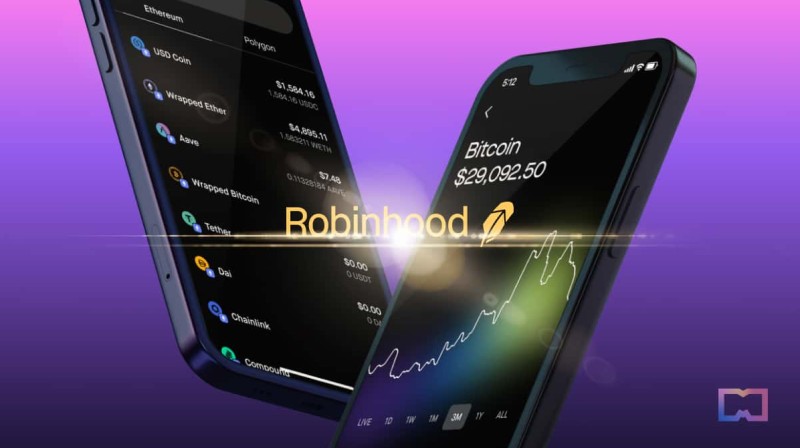
My Robinhood Wallet Review (Tears Included)
My Robinhood Wallet review began when my crypto seized tighter than my jeans post-buffet, and I sat there blinking at the screen like the app had personally insulted me. I'm one regular person who got stuck in the mud with transaction issues, so I dug into how this wallet works, where it came from, and how you might fix the stupid problems without crying into a pillow. This is a Robinhood Wallet review born from real friction, not a brochure.
The short version: Robinhood launched its stock app back in 2013 and opened trading to everyday folks with no commission fees. It moved into crypto in 2018 with Bitcoin and Ethereum, then kept adding coins and web3 stuff. The self-custodial Robinhood Wallet app showed up later, and that's the thing I'm picking at here.
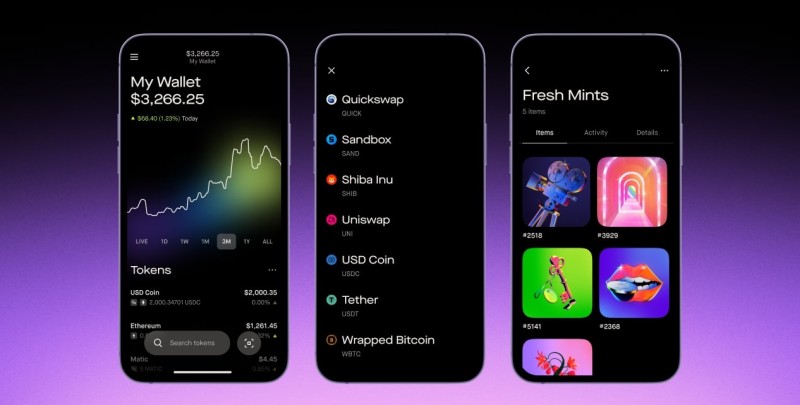
When the wallet first dropped, it was iOS only, in 130 countries, and started small in beta with ten thousand users. At first it was just Polygon chain, then Ethereum got added with more than fifty ERC tokens like COMP, MATIC, SHIB, SOL, UNI, and USDC. They said no network fees on Polygon, which is a nice touch when you're poor and salty.
Johann Kerbrat, GM of Robinhood Crypto, said: "With Robinhood Wallet we stripped away many of the complexities of DeFi and the broader Web3 ecosystem, and reduced some of the challenges and barriers to entry for everyday people."
Robinhood Wallet Background And Chains
The wallet is self-custodial, which means you hold your own keys and recovery phrase. That sounds free and good until you lose the scrap of paper and scream at the sink. Robinhood added Bitcoin and Dogecoin support after a while, plus in-app Ethereum swaps for over two hundred tokens for some users. They also brought in a web3 browser so you can poke at dApps straight from the wallet.
Networks now include Polygon, Ethereum, Arbitrum, Optimism, Bitcoin, and Dogecoin. For Ethereum swaps, the app takes the fee from tokens you already own, so you can swap even if you don't hold ETH. That part is decent, and it lowers the "why won't this send" pain a bit.
If you're asking how do i get a wallet for cryptocurrency without building one from scratch, Robinhood's setup is one path. You still need to store your own recovery phrase, same as a self custody wallet like Coinbase or others. The app makes you set Face ID, Touch ID, or a PIN each time you open it.
What the wallet supports
- Polygon and Ethereum with no Robinhood network fee on Polygon
- Bitcoin and Dogecoin custody, send, and receive
- In-app Ethereum swaps for 200+ tokens for select users
- NFTs on Polygon and Ethereum plus dApps like Uniswap
"We remain committed to our mission to make Robinhood the most trusted, lowest cost, and the easiest-to-use on-ramp to crypto." - Johann Kerbrat
Robinhood Wallet Security Basics
Security here is on you, friend. You set a Face ID, Touch ID, or custom PIN to open the app every time. Then you write down a recovery phrase, same as other self-custodial wallets. If you skip that step or dump the phrase, your coins are gone and no support desk can wave a magic wand.
People always ask me about the safest online crypto wallet option, and the honest answer is: a self-custodial wallet is only as safe as your habits. Robinhood's PIN and Face ID help, but the recovery phrase is the real weak spot. Don't snap a pic of it and email it to yourself, okay?
To pull crypto out to outside addresses, you must pass identity checks and turn on two-factor auth. That's Robinhood's KYC rule, and it's a hoop you jump through before any withdrawal works. It's annoying but it's the world we live in.
My Transaction Issues And How To Fix Them
My Robinhood Wallet review got ugly when my transfer froze mid-air. The app didn't crash, the chain didn't reject it, it just hung like a toddler told to put shoes on. I learned the hard way that you should check the transaction hash they give you and track it on a block explorer.
For Ethereum, use Etherscan. For Bitcoin, use Blockchain.com. Paste the hash, watch confirmations, and you'll see if it's stuck or just slow. Fees change with chain traffic, so a busy network can make a send feel like it died. Breathe, check the hash, don't panic-sell.
One more fix: match the coin to the address. Sending MATIC to an Ethereum-only address, or BTC to a DOGE box, can lose funds for good. I almost did the dumb thing once and my chest hurt. Double-check the address before you hit submit, every single time.
Quick fixes for stuck sends
- Copy the transaction hash Robinhood gives you
- Track it on Etherscan or Blockchain.com
- Confirm the recipient address matches the coin
- Wait for chain congestion to drop if fees look high
Selling Crypto On Robinhood Before Cash Out
Before you can move dollars to a bank, you usually need to sell the crypto unless you already hold cash. Robinhood gives four order types: market, limit, stop, and stop limit. Market is fastest but cancels if price moves more than five percent for over five minutes.
Limit orders let you name your price. Stop orders turn into market once a stop price hits. Stop limit mixes both so you keep more control. Pick based on how much you care about the exact dollar amount versus speed.
Heads up, selling crypto can trigger taxes in many places. The source notes CoinTracker can track this and make IRS-style forms, but that's not tax advice, just a tool mention. Talk to a tax pro if you're weirded out, which I was.
Steps to sell crypto in the app
- Go to the Crypto section
- Pick the coin and tap Sell
- Enter amount in dollars or coin
- Choose order type from the Actions menu
- Swipe up or click Sell to confirm
Withdrawing Cash From Robinhood To Bank
Pulling cash out is plain if your bank or card is linked. In the app, tap the person icon, open the three-bar menu, hit Transfers, then Withdraw. Type the amount, pick the Robinhood account, choose the bank or card, and decide instant or ACH.
On desktop, go to Account, then Transfer, then Transfer Money. Same基本 info: amount, source account, destination, instant or ACH. Check the details, confirm, and you're done. Easy until the limit bites you.
Timing matters. Instant withdrawals cost a 1.75 percent fee and usually land in minutes, max twenty-four hours. Standard ACH is free but can take up to five business days. The daily ACH limit is fifty thousand dollars and resets at 7 p.m. EST on business days.
Withdrawal rules to know
- ACH daily limit is $50,000, resets 7 p.m. EST
- Instant limit varies by user, resets 12 a.m. EST
- Instant fee is 1.75 percent of the transfer
- Standard ACH is free, up to five business days
Withdrawing Crypto To External Wallets
You can send crypto to outside wallets like MetaMask or a hardware device. Tap the coin, hit Send, enter the amount, paste the outside address, review, then submit. Robinhood pushes it to the chain and hands you a transaction hash.
Limits vary by coin, and fees depend on the coin and chain traffic. If you're moving to a best crypto wallet to use that you picked for control, just make sure it supports the chain. Wrong chain plus wrong address equals permanent goodbye to funds.
A small note on the google trust wallet style search people do: you don't need to google a wallet to withdraw, but you do need a real address from the wallet you trust. Robinhood won't babysit the transfer once it leaves their system.
"Using an incorrect address or selecting the wrong cryptocurrency could result in losing your funds permanently. Always double-check the recipient's wallet address."
Moving Crypto To Cold Storage
Cold storage means a hardware wallet, like Tangem or similar boxes that stay offline. The source had a guide for Robinhood to Tangem but blocked it in some regions, so I can't give those exact steps. The idea still works: withdraw to an outside wallet that supports your coin and chain.
If you wonder is cold wallet safe , the short answer is yes, safer from online theft. You still can lose the device or the backup, so treat the seed like cash under the mattress. Cold storage is for coins you don't trade daily.
Robinhood's own wallet is hot and self-custodial, not cold. To get to cold, you withdraw from Robinhood to the hardware wallet address using the steps above. Take your time, confirm the chain, and don't rush the review screen.
Robinhood Platform Limits And Past Failures
The source says Robinhood's clearing system failed during market surges, including a Bitcoin trading spike, and they blocked 116,000 accounts at one point. That tells me transaction issues can spike when things get wild. If the market goes nuts, expect possible delays.
For the wallet itself, there's no built-in block explorer, just the transaction hash. That's fine once you learn to use external sites. The app is iOS in 130 countries, with Android planned and a waitlist running.
If you're thinking about how to make crypto wallet choices, Robinhood is one easy on-ramp but not your only option. The edge app crypto type tools exist too, though I'm not reviewing those here. Keep your needs small and your phrases safe.
Robinhood Wallet Extras And Rewards
Robinhood added a fiat on-ramp called Robinhood Connect so eligible US users can buy or move crypto direct. They also dropped learning rewards where you finish short lessons and earn USDC. That's a quiet way to grab a little coin while you learn the ropes.
The wallet lets you hold Polygon and Ethereum NFTs and reach dApps like Uniswap, Balancer, and Kyberswap. If you want to know where can i get free crypto , those learning rewards are one spot, not a rug pull. Just read the lesson bits first.
They noted Android is coming and users can join a waitlist. iOS users got the learning rewards first. It's a slow roll, but the direction is more chains, more tokens, less friction for normal people.
Wallet extras worth noting
- Robinhood Connect fiat on-ramp for eligible US users
- USDC learning rewards for short lessons in wallet
- NFT support on Polygon and Ethereum
- dApp access like Uniswap and Kyberswap
Robinhood Wallet Review On Multi-Chain Swaps
The in-app Ethereum swaps are the part that actually helped my sanity. You can swap without holding ETH because the fee comes from the tokens you already own. For a person stuck in a send loop, that's a small mercy.
Swaps rolled out to select users first, then wider. Over two hundred tokens are in the mix for some accounts. If your account doesn't show it yet, give it time; the source says they expand access in stages.
This Robinhood Wallet review wouldn't be full without saying the swap feature cuts a common headache. No more "I need ETH to buy the token that gives me ETH" nonsense. It just deducts from what you have.
A Note On The Ravencoin Side Path
Some folks ask about a ravencoin wallet when they leave Robinhood, since RVN is not in the listed support here. The source doesn't show Ravencoin on Robinhood Wallet, so you'd withdraw to an outside wallet that supports it. Check the coin and chain before you send.
I'm not hyping RVN, just noting the path. If Robinhood doesn't list a coin, the self-custodial wallet still lets you leave to one that does. That's the point of self-custody: you're not trapped.
Why I Wrote This Robinhood Wallet Review
I wrote this because my coins wedged tighter than my waistband after a feast, and I didn't want you to feel that alone. The fixes are boring but they work: check the hash, match the address, know your limits, use cold storage for sleep-easy coins.
Robinhood Wallet is a simple on-ramp with real self-custody and a few rough edges. It won't hug you when a send hangs, but the tools are there if you look. My sanity is still iffy near the sink, yet here we are.

Comments on “A Robinhood Wallet Review For When You Can't Send Crypto Without Crying Into A Pillow”
No comments yet. Be the first to share your thoughts.