
- The assets you want to trade
- The country and currency you can use
- Licensing, custody, and account security
- Trading, deposit, withdrawal, and conversion fees
- Order types and the quality of market data
- Research tools that match your method
- Customer support and account access
- Rules for transferring your holdings out
How to Find the Best Share Trading App That Actually Works for You
9 October, 2026
0 comments
How to Find the Best Share Trading App That Actually Works for You
There is no single best share trading app for everyone. A simple stock app may suit someone buying a few ETFs, while another trader needs options, crypto, advanced orders, or a social feed. The right choice also depends on your country, currency, account size, and experience. I would judge the app on money and risk first, then on extra features. A clean screen cannot fix weak fund protection, unclear fees, or an account you cannot reach when the market is moving.
The first things I would check
A glossy ad does none of that work. It only tells you what the seller wants you to notice. Your job is to pull up the fee schedule, security notes, custody model, and account rules, then compare them with the way you plan to trade.
Security Comes Before Features
Security is not a side feature. It decides who holds your money, who can see your login, and what happens when a phone is lost or a connected service is breached. A licensed app can still have outages or support weak controls, while a long feature list says nothing about how customer assets are held.
Security checks worth doing
- Look up the app in the relevant regulator’s records
- Find out which legal entity holds the account
- Turn on two-factor authentication
- Check whether customer crypto uses cold storage
- Review connected apps and third-party permissions
- Find the account recovery and support process
- Look for clear risk and outage notices
The app name may not be the company name that appears on your account. The source lists Busha as licensed by Nigeria’s Securities and Exchange Commission. It says Woodstock uses Alpaca’s local-currency system in Japan, where Alpaca had acquired a Japan FSA-approved broker-dealer. Wealthfront divides advisory and brokerage services between separate regulated entities. Robinhood also uses different entities for brokerage, clearing, crypto, and self-custody services in different regions.
That structure matters because you need to know who is responsible when something goes wrong. It also matters for connected services. Granting a third party permission to view an account or make transactions can expose your assets. Cold storage matters mainly for crypto, but every account still needs strong login controls and a clear recovery plan.
Know the Full Cost Before You Trade
“Zero commission” is not the same as free trading. An app may not charge a commission for each stock trade while still charging for currency conversion, instant transfers, regulatory fees, spread markups, or optional data. The cost can also appear as interest on idle cash rather than a line at checkout.
Cost lines to check
- Charge for each trade or contract
- Percentage charged on each transaction
- Deposit and withdrawal fees
- Currency conversion or swap costs
- Markups hidden in the quoted price
- Interest on uninvested cash
- Paid research and market data
Funding rules deserve the same care. Woodstock lets Japanese users trade U.S. stocks with yen instead of first converting to dollars, and the source reports a 1,000-yen entry point. Busha offers local funding and withdrawal methods for Nigeria. Wealthfront can split one deposit among several stocks. These features may save time, but the minimum, transfer speed, eligible payment method, and cash-out rules still need to be checked for your account.
A 2016 Robinhood account described a bank transfer that could take about three days without instant buying power. That is not proof of how the app works now. It is proof that transfer speed and minimum funding rules can change. I would read those terms before assuming cash will be ready when I see a stock I want.
Match the App to Your Assets
The best share trading app depends on the market you actually want. A stock and ETF app may not help if you trade options, cryptocurrency, prediction markets, tokenized assets, or commodity contracts. Some services focus on one market, while others mix trading with payments, social posts, creator tools, or automatic investing.
What each market asks for
- Stocks and ETFs need company data and reliable execution
- Options need risk details and suitable order controls
- Crypto needs custody, wallet, and cash-out details
- Commodities need contract and leverage information
- Fractional investing needs clear minimums and rounding rules
- Advanced markets need live prices and honest risk warnings
When your search turns to the best app for cryptocurrency trading , coin count is only one check. For an app built for crypto trading , the wallet and cash-out process may matter more than a crowded trade screen. The wider question- what is the best app for crypto trading -still comes down to custody, fees, legal access, and support.
For readers comparing crypto trading apps in the USA , check the exact service and region offered to you. A list of popular crypto exchanges can show which assets exist, but it cannot tell you whether your money is protected or whether you can withdraw it when you need to.
Orders Can Save Money or Create New Risk
A market order asks for an immediate trade, and the fill price can differ from the price you saw. A limit order gives you more control by naming the most you will pay. The source uses Apple as an example: buy only if the price reaches $95 or less. The app sets aside the needed buying power while the condition is open.
That reserved money is no longer free for another purchase. A stop-loss can request an automatic sale at a chosen level, while price alerts can help you watch a stock without keeping the app open. Conditional and advanced orders carry extra risk because they depend on correct triggers, accurate data, and working outside systems.
A real-time market order can be processed at a different price because of the delay between entering and executing the order.
A conditional order may not be held by the market until its condition is met. A crash, outage, or trigger near the close can stop it from being sent or filled. The source describes these orders as best-efforts after activation, so the app’s promise should not be read as a guarantee.
Research Tools Should Match Your Method
A research screen should help you answer a question, not just fill the page with numbers. Long-term investors may want years of prices, dividend records, company details, and plain descriptions of risks. Active traders need faster data, screeners, and bid-and-ask prices. A trader who reviews decisions later may want a journal and trade stats.
Tools by trading method
- Long-term holding: price and dividend history
- Stock picking: company facts and balanced collections
- Active trading: screeners and live bid-and-ask data
- Idea tracking: watchlists, alerts, and news feeds
- Trade review: journals, notes, charts, and performance stats
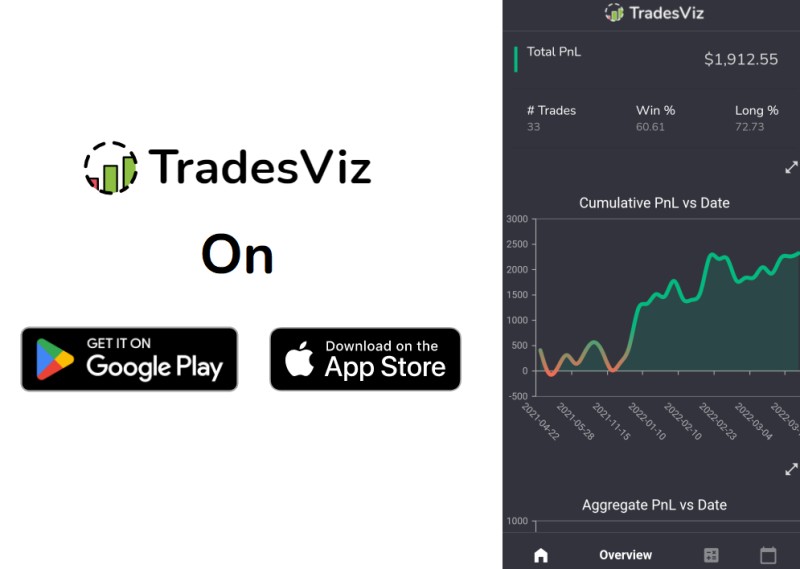
Wealthfront uses curated stock collections and stock pages with company details, long-term performance, dividend yield, volume, and market value. TradesViz takes the after-trade side. Its app and journal tools let users add trades, notes, tags, images, statistics, simulators, backtests, screeners, and market-specific records. TradesViz says it is an analysis and journal platform, not an investment adviser.
No single app has to supply every tool. In a 2016 Robinhood account, the writer used Yahoo Stocks for longer price and dividend history, ClosingBell for ratings and alerts, and WikiWealth for company metrics and ideas. That old account is not a current recommendation. It is a useful warning against assuming one order screen is enough research.
Social Features Can Help, but They Are Not Advice
A social feed can help you see how other people think, compare strategies, and find trades you would have missed. It can also add noise, herd behavior, and pressure to copy a loss. Customer posts and public trade records are opinions and actions, not advice from the app company. A verified profile may show that an account belongs to a real customer, but it does not prove the person is skilled or the trade is sound.
Woodstock joined U.S. stock trading with a feed where users could share portfolios, investment picks, news, and ideas. Robinhood Social was described as a feed built around verified profiles and visible trades. Users could discuss strategies, follow traders, review past positions, and trade manually from the feed. The platform was clear that customer views were not its own recommendations.
Base takes social trading in a different direction. Its feed connects posts, creators, tokenized assets, payments, and open-market activity. That may appeal to people who want market context beside the content, but it also adds rules about third-party services, digital wallets, leveraged products, and assets that many stock apps do not touch. A social layer should support your research, not replace it.
Reliability Matters When the Market Moves
A reliable app needs more than a quick screen. It needs sound order execution, dependable account access, accurate data, and a clear way to reach support. Repeated outages can stop you from buying or selling at the moment you need to act. Transfer rules matter too, because an account you cannot move may become a locked account.
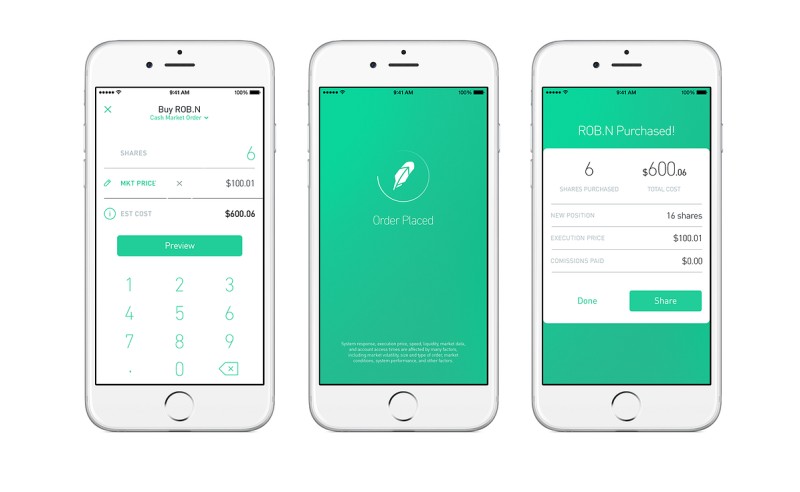
A 2016 Robinhood account raised several basic issues. The writer described delayed bank funding, a lack of long price history, and the need to keep cash ready before placing an order. A later update from 2021 reported trading restrictions during the GameStop episode, repeated outages, concern over uninsured account descriptions, and crypto that could not be transferred. Those were one person’s experiences, not proof that every app behaves the same way.
Don’t rely on one app for research.
The lasting lesson is to ask harder questions. How does the app handle an outage? Can you remove third-party access? Are some assets harder to withdraw than others? What support hours apply? A paper account can help you learn how conditional orders and automated tools behave before real money is at risk.
What Fast Market Data Looks Like
Active traders need quotes and trades to arrive with little delay. A quote shows what buyers and sellers are willing to pay at that moment. The bid is the highest buyer price, while the ask is the lowest seller price. A trade records an actual match between a buyer and seller. Prices that arrive late may be little more than old news.
When judging a best day trading app , check whether it shows live market data, real-time bid and ask prices, and the time behind delayed information. Also ask whether the data can be wrong, stop updating, or differ from another service.
Data checks for active traders
- Live bid and ask prices
- Actual trade price, size, and time
- A screener with useful filters
- Clear notice when data is delayed
- Order status after submission
- A record of partial fills and failed orders
The technical source uses a live connection to push quote and trade updates instead of making repeated requests that can miss changes between checks. You do not need to know the software to use that lesson. If you trade fast, ask how fresh the prices are and what happens when the feed falls behind. A fast-looking screen is useless if the numbers are stale.
Crypto Apps Need Extra Care
Among cryptocurrency exchange apps , custody can matter as much as the trade screen. A name that appears in lists of the best cryptocurrency trading platforms is only a lead, not proof of safety. A top cryptocurrency trading platform may still lack two-factor login or clear local cash-out rules. Names of cryptocurrency trading platforms also tell you little about who holds customer coins.
Crypto app checks
- Find out whether the company or user holds the coins
- Check licensing and local financial rules
- Use two-factor authentication and withdrawal locks
- Find out how much crypto uses cold storage
- Review spread, fee, and conversion markups
- Test the support and cash-out process
- Treat rewards and high yields as changeable extras
Do not assume crypto balances receive the same protection as brokerage cash. Crypto can also move sharply, suffer cyber attacks, face market manipulation, and lose value quickly. A broad coin list, interest feature, cashback offer, or automated trade cannot fix weak custody. Reward rates can change by asset or region, so treat them as a bonus rather than the reason to choose an app.
Busha says it offers local funding and withdrawals for Nigeria and is licensed by Nigeria’s Securities and Exchange Commission, so its regulator record should be checked before use. The Base App combines crypto trading, payments, social posts, USDC rewards, and tokenized assets. It also warns that third-party services have their own terms. Those examples show why one app can be simple for buying a token and much harder for custody, transfers, or outside services.
Watch Leverage and Complex Products
The most eye-catching product is not always the safest one. Margin can add interest, require more collateral during a loss, and leave you responsible for more than the cash you put in. Options can produce a large loss. Perpetual futures and other leveraged crypto products add sharp price moves and forced-position risk on top of market risk.
Warnings tied to complex products
- Margin losses can exceed the amount deposited
- Options carry a high risk of large loss
- Perpetual futures can close a position quickly
- Commodity contracts can gain or lose value fast
- An ETF price can differ from its asset value
- A stop order can fail during market or system trouble
All investments involve risk. Past performance does not guarantee future results.
Diversifying can spread some exposure, but it cannot promise a profit or protect you from a broad loss. If a product is hard to explain, start with a paper account or a small amount. A complex feature should not be used simply because the app puts it one tap away.
Different Apps Fit Different People
The source gives useful snapshots, but it does not prove that one app should beat every other. The right example depends on your market and your habits. Some apps focus on long-term stock investing, while others center on crypto, social activity, or trade review.
Examples from the source
- Woodstock: U.S. stocks and ETFs in yen with a social feed
- Wealthfront: fractional shares, stock collections, and multi-stock deposits
- Robinhood Social: verified profiles, visible trades, and market discussion
- Base App: social posts, payments, tokenized assets, and crypto markets
- Busha: local Nigerian crypto funding, withdrawals, earning, and spending
- TradesViz: trade journals, charts, screeners, simulators, and backtests
- Robinhood: simple stock orders, but older accounts raised research and access concerns
A person who wants to build a long stock portfolio may care more about fractional shares, collections, and low cash drag. An active trader may care more about live data, order types, and reliable execution. A crypto user may need local payment rails and cold storage. Someone learning may value lessons and community, as long as advice is kept separate from fact.
Test the App Before You Trust It With Money
A paper account is useful for orders and automation, but it cannot copy every live-market problem. If you use real money, start small and learn the full path: fund the account, place an order, read the confirmation, and find the record of what happened. Do this before increasing the amount.
A short test routine
- Read the fee schedule before the first order
- Check the legal entity and regulator record
- Turn on two-factor authentication
- Review connected apps and withdrawal holds
- Ask support how assets leave the account
- Use a paper account for conditional or automated orders
- Compare the same checklist across several apps
I would keep a one-page note for each app. Record the account type, assets, custody model, order rules, fees, funding times, support hours, and transfer limits. That note will make the differences plain and keep a slick sales pitch from making the decision for you.
A Simple Way to Make Your Final Choice
The best share trading app is the one that passes your own checks, not the one with the longest feature list. Give the most weight to anything that could cost money, block a withdrawal, or expose your account. Then choose the app that offers the right market and tools for your level.
My final app scorecard
- Can I verify the app and its regulated entities?
- Do I understand who holds my money or crypto?
- Can I turn on strong login protection?
- Do I know every trade, deposit, and cash-out fee?
- Can I fund the account in a supported local method?
- Does it offer the exact assets and orders I need?
- Does it provide enough history and live data?
- Have I checked outage, support, and transfer rules?
- Is any social content separate from real advice?
- Am I comfortable with the worst loss I could face?


Comments on “How to Find the Best Share Trading App That Actually Works for You”
No comments yet. Be the first to share your thoughts.