Cryptocurrency Exchange Apps: How to Pick One That Won't Let You Down
Cryptocurrency Exchange Apps: How to Pick One That Won’t Let You Down
There is no single “best” cryptocurrency exchange app for everyone. When people search for what is the best app for crypto trading , they get sales pages, rankings, and lists that all seem to settle the same question. They do not. A simple app can hide high fees. A heavy trading app can be too hard to use. A wallet can give you more control while also putting more work on you.
The right choice depends on four hard facts: what you plan to buy, how much you plan to trade, who will hold your money, and which services are allowed where you live. Price swings matter too. Even a clean app with good support cannot remove the risk of buying an asset that later loses most of its value.
I compared the app descriptions, fee models, security claims, and custody models in the source material. Parts of it come from dated snapshots, and one app described itself in its own words. So I will not turn old marketing copy into a fake league table. I would use these points as a method, then check the live fee page, asset list, and account rules before trusting an app with money.
Centralized, decentralized, and hybrid exchanges
The first choice is the exchange model. It decides who takes orders, who holds funds, and who helps when something goes wrong. A search for a crypto currency trade platform can lead to all three models, but they do not offer the same mix of control, support, and trading tools.
Three exchange models
- Centralized exchange: A company controls the platform, processes trades, and holds users’ funds.
- Decentralized exchange: Users trade from their own wallets without giving an exchange direct control of the funds.
- Hybrid exchange: The design tries to mix direct asset control with the liquidity and ease of a centralized service.
Centralized exchanges such as Coinbase, Binance, Kraken, and Gate.io tend to offer more familiar account flows. Decentralized exchanges such as Uniswap and PancakeSwap put more weight on wallet control. Hybrid exchanges were still described as an early idea, so a hybrid label should not replace real testing of custody, fees, and support.
Centralized exchanges are easier, but custody creates risk
Centralized exchanges are often easier for a first-time buyer. You sign in, connect a payment method, choose an asset, and place an order. The platform may also offer charts, customer service, staking, margin trading, and more order types. That makes life easier until the company has a breach, freezes withdrawals, or fails.
The source treated this as a real trade-off. A CEX can offer high trading volume, strong support, and a wide choice of assets, but the company controls the keys and the servers. KYC rules and security controls can lower some risks. They do not remove the risk of relying on one company.
What a centralized exchange may offer
- Many coins and trading pairs
- High liquidity and a large order book
- Market, limit, stop-loss, margin, and futures tools
- Account help and payment gateways
- Staking, lending, and wallet features
- Regulatory and security controls
A centralized exchange may be easier to start with, while a decentralized exchange may suit someone who puts more weight on direct control.
Start with claims, not brand names
A long feature list says very little until you know who controls the money. A “secure” badge may come from the company itself. A large user count may describe popularity, not safe custody. And a market that ranks platforms for best cryptocurrency exchanges often leaves out regional limits, extra fees, or the risks of advanced tools.
Start by matching the exchange to the job you need. Do you want to buy one coin with dollars? Do you trade often? Do you need a broad list of smaller coins? Do you want to hold keys yourself? A plain answer will cut the list faster than any marketing slogan.
Questions that narrow the field
- Do I need simple dollar-to-crypto purchases, or active limit and margin trading?
- Do I need a wallet, staking, lending, copy trading, or a debit card?
- Do I want an exchange to custody funds, or do I need a self-custody wallet?
- Are the assets and payment methods I need allowed in my country?
- What does the app charge for trading, deposits, withdrawals, and conversions?
- What happens to my account and assets if the platform stops working?
Coinbase: a simple entry with more beneath it
Coinbase has been a major exchange since it was founded in 2012. The source described a clean interface, assets such as Bitcoin, Ethereum, and Litecoin, a wallet service, and an easy path to buying and selling. That made it a common choice for people who did not want to start with a dense trading screen.
The fee example in the source material shows why a friendly screen needs a closer look. One comparison described a spread of about 0.50% on purchases and sales, plus a separate Coinbase fee that was either a flat charge or a variable percentage. That is a source snapshot, not a live quote. The exact fee can also change with region, payment method, transaction size, and product.
The source also listed Coinbase Pro, staking, yield services, wallet support, custody for large investors, APIs, charts, and transaction histories. More tools can help an active trader, but they can also turn a simple app into a bundle of services with separate rules. I would not pick it for “beginner friendly” alone. I would check which parts I need and what each part costs.
Coinbase questions
- Is my main goal a simple buy-and-sell flow, or do I need advanced order tools?
- Can I see the full fee before I confirm the trade?
- Does the app or wallet hold my keys?
- Are the coin, payment method, and withdrawal route available where I live?
- What support is offered for a failed payment, delayed withdrawal, or locked account?
Binance and Kraken offer deeper markets and tools
The source described Binance as a high-liquidity exchange with many order choices. It listed limit orders, stop-loss orders, margin trading, professional charts, and apps for iOS and Android. Those tools can suit an active trader who knows how they work. The same material said the app could feel less easy for a first-time buyer and had faced regulatory trouble in several countries.
Kraken was described as an older exchange with a strong security focus. Its list included margin trading, futures, staking, competitive fees, and tools for experienced traders. The source did not agree on how hard the app is to learn. One account called it intuitive, while another said it had a steeper learning curve than Coinbase.
Binance and Kraken compared
- Liquidity: Binance was tied to high volume; Kraken was described in terms of security, fees, and tools.
- Order tools: Both were linked to more advanced trading than the simplest beginner apps.
- Beginner use: Binance was described as less approachable in one comparison; Kraken’s ease of use differed by source.
- Extra services: Kraken was listed with futures, margin, and staking; Binance was listed with professional order tools.
eToro, Robinhood, and Crypto.com serve different needs
eToro mixes crypto trading with a social feed and copy trading. You can watch other traders, share strategies, or copy another user’s trades. The source described no commission, but a spread that can grow during heavy market moves. Social tools may make the app friendly to some people, while the extra menu can confuse anyone who only wants to buy and hold.
We understand that some people lack the time or experience to use traditional methods of online investing or trading.
Robinhood was presented as a simple general trading app with commission-free crypto purchases. That description came from a beginner-focused overview, and the source did not include a full crypto fee schedule or advanced trading list. Crypto.com was described as a wider set of services, including a debit card, staking, and lending. Its basic app was called easy to use, but the advanced tools were not.
Different setups
- eToro: Best fit for people drawn to social feeds, shared strategies, or copy trading.
- Robinhood: A simple general investing app, with crypto details that need a fresh fee check.
- Crypto.com: A wider service bundle with card, staking, and lending options.
- Coinbase: A common starting point for a simple interface, wallet, and buying flow.
- Kraken or Binance: More trading tools and a deeper market for active users.
- A DEX: A different choice for people who want to trade from their own wallet.
Gate.io, KuCoin, Tradix, and regional apps
Gate.io was described as a centralized exchange for novice and experienced traders, with spot, futures, margin, and a broad list of coins and pairs. Its listed security tools included multi-signature technology, cold-wallet storage, two-factor authentication, and anti-phishing features. KuCoin was linked to a large altcoin list, low fees, staking, and lending. The source also warned about its less settled legal position in some regions.
Tradix was described with real-time data, charts, indicators, and secure trading. Those claims came from a Tradix-authored overview, so I would treat them as a list to test, not proof of safety. Regional apps can also matter. Busha material showed local-currency pairs, fiat withdrawals, and fee promotions in Nigeria and Kenya. A listing named USDT/PI and KES/PI pairs, while the Nigerian naira pair was not listed.
Regional and smaller-platform checks
- Can I buy and sell with the local currency used where I live?
- Can I withdraw to a local bank or payment method?
- Are the listed coins available under local rules?
- Does the app publish clear fees for deposits, withdrawals, and conversions?
- Who holds the funds, and which company is responsible for support?
- Are the security claims backed by a public audit or written policy?
Fees are often hiding in the small print
A low trading fee can still produce a high bill. The source found several models: a flat fee, a percentage fee, a spread, a payment cost, a withdrawal charge, or a discount for higher-volume users. When you search for the best place to buy crypto currency , look at the total cost of buying, holding, and taking money out.
The old Coinbase example included a spread plus another charge. eToro was described as commission-free with a spread. Robinhood was described as commission-free for crypto. Binance, KuCoin, and Gate.io were called lower-fee in their comparisons, while Kraken was called competitive. None of those labels replaces a real quote for your own transaction.
Costs to check before you fund an account
- The spread between the bid and offer price
- Flat or percentage fees on buys and sells
- Payment-processing costs for cards or bank transfers
- Withdrawal fees for sending crypto to another wallet
- Conversion fees when moving between two crypto assets
- Vault, staking, lending, or subscription charges
- Higher fees for small transactions or lower user tiers
A product advertised as commission-free may still include a spread, withdrawal charge, payment-processing cost, or another fee.
Liquidity and order tools tell you who an app is for
Liquidity matters when you want to trade without waiting. The source tied Binance to high liquidity and large trading volume, while centralized exchanges were generally described as having more liquidity and more trading choices than major decentralized exchanges. That does not make one exchange right for a new buyer. It tells you which kind of market the app is built for.
Coinbase was repeatedly tied to an easier buying and selling flow. Binance, Kraken, Gate.io, and KuCoin were linked with more order types and advanced tools. Margin and futures can change the risk of a position, and crypto prices can swing hard. A feature is not a better deal just because it sits in the app.
Questions by user type
- New buyer: Can I understand the buy screen, total cost, and custody model?
- Frequent trader: Does the app show enough liquidity, order types, charts, and price data?
- Altcoin buyer: Is the coin listed, and is the pair available where I live?
- Yield seeker: What is the real reward after the platform takes its fee?
- Social trader: Do I understand how copy trading works before copying another person?
- Risk-sensitive user: Can I tell which tools use borrowed money or can increase losses?
There is no honest universal list of the best cryptocurrency trading platforms without knowing the trader. A simple app can be better for one person and useless for another. Search pages for popular crypto exchanges mix fame with quality, so use them as a starting list and not the final choice.
Wallets decide who controls your crypto
A crypto wallet is a tool for managing the keys that authorize transactions. It does not always hold the coins themselves. The keys prove control of assets recorded on a blockchain. A centralized exchange holds those keys for you. A non-custodial wallet keeps them on your device, but the app may still rely on outside servers to show balances, prices, or token data.
Wallet and custody terms
- Custodial wallet: A company stores and manages your keys and assets.
- Non-custodial wallet: Your keys stay under your control, usually on your device.
- Hardware wallet: A physical device stores keys away from a connected computer or phone.
- CEX account: The exchange controls the keys and the funds connected to the account.
- DEX trade: You sign wallet-to-wallet trades, but the app and infrastructure can still fail.
- Institutional custody: A provider stores assets for large holders and may charge a management fee.
Decentralization lowers one kind of custody risk, but it does not erase dependence on code, interfaces, APIs, cloud services, or outside data providers. The web3 analysis in the source made this point sharply: a non-custodial wallet can keep keys on the device while still calling a centralized service for balances or transaction data.
Even when MetaMask connected to an application, the wallet commonly communicated with blockchain infrastructure through Infura.
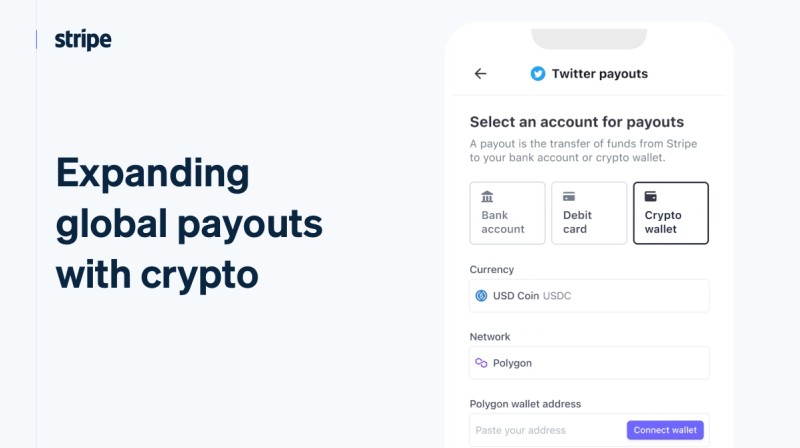
The same lesson applies to payment features. A Stripe example used USDC on Polygon for creator payouts while Stripe handled acquisition, storage, transfer, and KYC. The app could offer payouts without building every piece itself. It also means you need to ask who holds the money, which keys are involved, and which company handles a failed payment.
Security controls need more than a green checkmark
Exchange apps handle personal details, passwords, payment information, and crypto keys. The source listed encryption, cold storage, multi-signature authorization, two-factor authentication, identity checks, monitoring, audits, and user education. These controls help, but you still need to know whether they are in place and how they work.
Cold storage means keeping long-term assets away from an internet-connected system. A hot wallet handles the smaller balance needed for trades. One security practice in the source set a target of keeping at least 95% of assets in cold storage, but that figure was a target, not proof about any named exchange. Do not treat a marketing number as an audit.
Security checks for a new account
- Turn on an app-based authenticator rather than relying only on SMS.
- Use a unique password and keep it out of shared notes and screenshots.
- Check whether the exchange uses cold storage, hot wallets, and multi-signature access.
- Look for an audit history and regular penetration tests.
- Confirm that withdrawal addresses and account recovery steps are clear.
- Learn the common phishing messages that target exchange users.
Support is part of security, too. An app can have a safe-looking login page and still fail to explain a frozen account, delayed withdrawal, or suspicious login alert. Ask the support team a real question about custody, fees, and identity documents before you trust the account with a large balance.
KYC and local rules can block the trade
KYC means Know Your Customer. It checks who opened an account and handles identity documents. AML systems watch for fraud, money laundering, financing of terrorism, and other banned activity. These controls are not a promise that a platform is safe. They are rules for who can use the service and how the company monitors accounts.
Local rules decide which coins, fiat pairs, payment methods, and withdrawal routes appear. A coin can be listed in one country and missing in another because of local law, payment rules, or sanctions. The app may also limit staking, lending, cards, custody, or margin trading by region.
Regional questions
- What identity documents are required?
- What fiat currency can I use for deposits and withdrawals?
- Which crypto assets and trading pairs are available to me?
- Can I send funds to an external wallet?
- Are margin, futures, staking, lending, or cards offered in my area?
- What happens if I move or open an account in another country?
For a reader searching for the best cryptocurrency exchange in the USA , local access is the first filter. Check the app’s rules for your exact state and payment method. A platform can be well known in one region and unavailable in another, so a global name is not enough.
Mobile access, support, and ease of use
A mobile exchange app should let you see balances, prices, orders, deposits, withdrawals, and security settings without forcing you through a maze. The source also called out fast load times, clear navigation, real-time charts, price alerts, educational resources, and responsive support. Those details matter when a payment fails or a price is moving fast.
The best trading app for cryptocurrency is not always the one with the most buttons. Crypto.com was described as easy at the entry level but hard when advanced services opened up. Kraken drew mixed reviews. Coinbase was often called approachable, while its wider service set added more to read.
What a usable app should show
- Clear buy, sell, deposit, and withdrawal steps
- Fast order pages with the fee shown before confirmation
- Price alerts, watchlists, and simple charts
- Visible order status and a full transaction history
- Wallet and account settings without hidden menus
- Support that answers a specific account or payment question
The question where can you buy cryptocurrencies has no single global answer. The answer changes with your country, payment method, and the asset. Check the live asset list and the local rules before you download anything or send money.
Charts, alerts, and records help you inspect the account
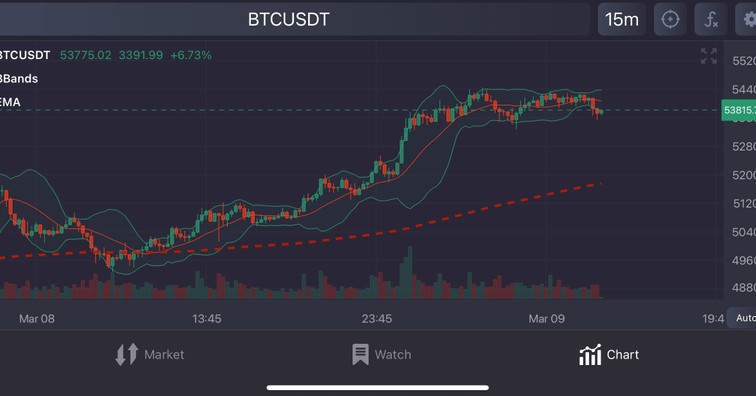
Real-time price charts, watchlists, alerts, portfolio views, and transaction histories are core exchange tools. They are useful because crypto prices can move while you wait. They are also useful after a trade, when you need to know which fee was charged and where the funds went.
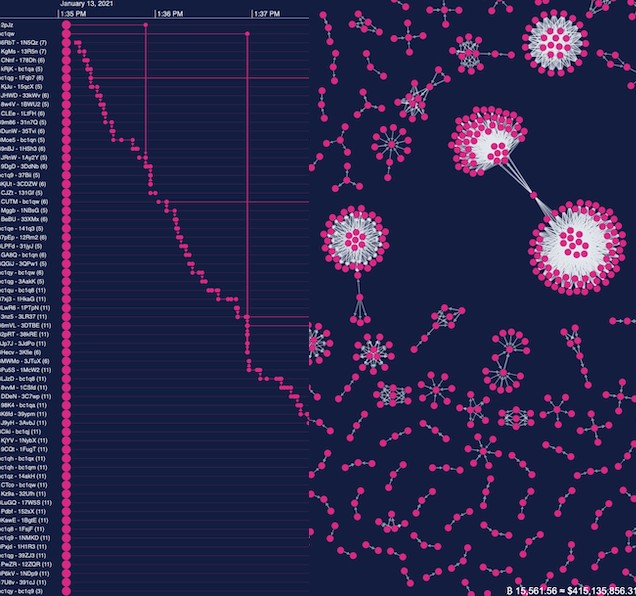
The source included a Bitcoin monitoring demo that placed a network graph beside a timeline. The graph showed relationships among addresses and transactions. The timeline showed sequence and timing. One view without the other could miss part of the story. The same rule applies to an exchange app: a balance number alone does not explain how a trade happened.
Records worth checking
- Date, time, asset, quantity, and order type for each trade
- The full fee and the price used for the transaction
- Deposit and withdrawal records with their status
- Order history that shows when an order was filled or canceled
- Portfolio views that separate balances by account or wallet
- Alerts for sign-ins, withdrawals, and major account changes
More features can mean more tradeoffs
Exchange apps grew from simple buy-and-sell screens into wider services. The source listed wallets, staking, lending, copy trading, analytics, payment cards, institutional services, APIs, and payment rails. Some of these can be helpful. They also create more fee rules, security questions, and support cases.
The source says platforms can earn from trading fees, subscriptions, staking rewards, crypto loans, wallet fees, custody, and referrals. No yield rate was given for the apps described, so a reward number should not be treated as income without checking the full terms. A free-looking service may make money from spreads, subscriptions, or a share of rewards.
Questions before enabling a service
- What fee does the platform take from my rewards or loan interest?
- Can I see the full risk and loss terms before I opt in?
- Does the service require a separate wallet or extra permission?
- Can I turn it off, and what happens to the associated balance?
- Is the feature available in my region?
- Does the app explain the feature in plain language?
The source’s development notes say feature depth, security work, and scale all change the cost of building an exchange app. That matters to buyers because a crowded menu can hide the basic flow. More tools are not proof of better service. They may simply mean more places for a fee, a rule, or a mistake to hide.
How I would compare cryptocurrency exchange apps
I would start with a short list made from the same question: what do I actually want to do? Search results for app crypto trading often mix simple buying with margin, futures, copy trading, and yield products. Those are not the same activity. Keeping the task narrow makes the choice easier.
A practical comparison path
- Write down whether you need simple buying, frequent trading, a broad coin list, or self-custody.
- Check which apps support your country, local currency, and payment method.
- Read the full fee page for a buy, a sale, a conversion, and a withdrawal.
- Separate custodial funds from wallet-controlled funds in the app’s account model.
- Look for two-factor authentication, cold storage, audits, and clear account recovery.
- Use the charts and order tools you need, then ignore the ones you will never touch.
- Ask support about a failed payment, delayed withdrawal, and identity check before funding.
- Compare the final cost and the final owner of your keys, not the app’s headline slogan.
A ranking can still be a useful shortlist if it tells you why each app made the list. It should say whether the score came from fees, assets, liquidity, security, or ease of use. If it does not, the ranking is mostly a taste test. I would rather have a smaller list with clear reasons than a long table that treats every feature as a virtue.
The plain checklist before you fund an account
Here is the short list I would keep open while comparing a new app. It is not a promise that the app is safe or profitable. It is a way to slow down long enough to see the trade-offs before money moves.
Before your first deposit
- Confirm that the app and the asset are available in your country.
- Read the fee schedule for buying, selling, converting, and withdrawing.
- Find out whether the exchange holds your funds and private keys.
- Check whether a self-custody wallet is needed for long-term holdings.
- Turn on two-factor authentication and secure the recovery details.
- Look for cold storage, multi-signature controls, audits, and an audit history.
- Review the mobile buy, sell, deposit, and withdrawal screens.
- Check the history for fees, order status, and wallet transfers.
- Ask support about local limits, identity documents, and delayed payments.
- Keep the amount you can lose small enough to live with.
If the app cannot give you clear answers about fees, custody, security, and withdrawals before you add funds, pass. And remember that the app is only one part of the risk. A well-built exchange can still list an asset that falls hard, and a self-custody wallet can still be lost to a bad seed phrase or a stolen device.

Comments on “Cryptocurrency Exchange Apps: How to Pick One That Won't Let You Down”
No comments yet. Be the first to share your thoughts.