What to Consider When Picking Examples of Cold Wallets Like a Sensible Human
Examples of Cold Wallets, Explained Like a Friend
I keep seeing folks get scared off by crypto storage talk. So I wanna lay out examples of cold wallets in plain words. A cold wallet just means your crypto keys sit offline, away from the net. That simple fact is what keeps your coins safe while you sleep.
The short version: examples of cold wallets like Ledger just sit there offline, and that's the point. Your crypto stays put, and hackers can't reach it through the wire. I like that kind of boring safety.
You don't need to be some crypto genius for this. We'll chat about examples of cold wallets like Ledger or Keystone, why they stubbornly stay offline, and how that keeps your coins away from the kind of trouble that makes people cry.
What a Crypto Wallet Actually Holds
A crypto wallet is a device or program that stores keys, not the coins themselves. The coins live on the blockchain, written in public records. Your wallet keeps the private key and seed phrase that let you sign for moves.
If you lose the wallet and can't get back in, the crypto is still on the chain but useless. The private keys are gone. So protect those keys like cash. That's the whole job of a wallet, really.
If a user loses access to a digital wallet and cannot recover it, the cryptocurrency remains on the blockchain but becomes unusable because the private keys are lost.
Cold Storage vs Hot Wallet
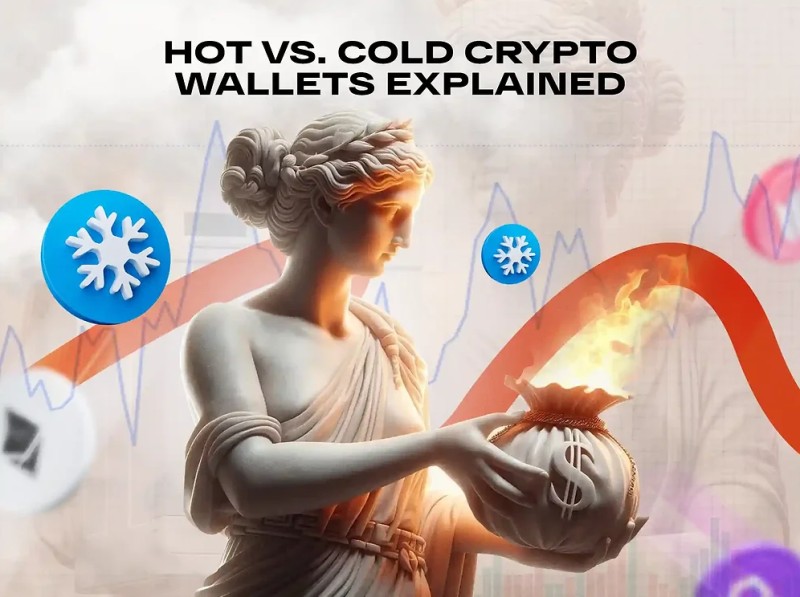
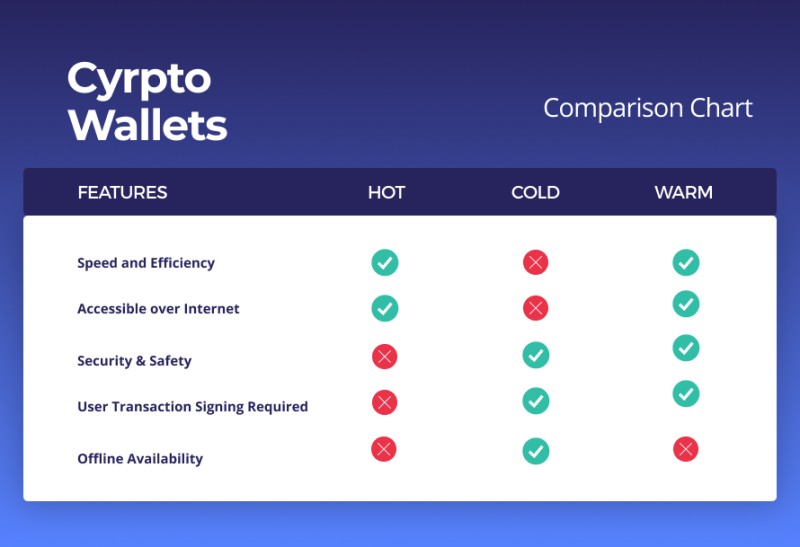
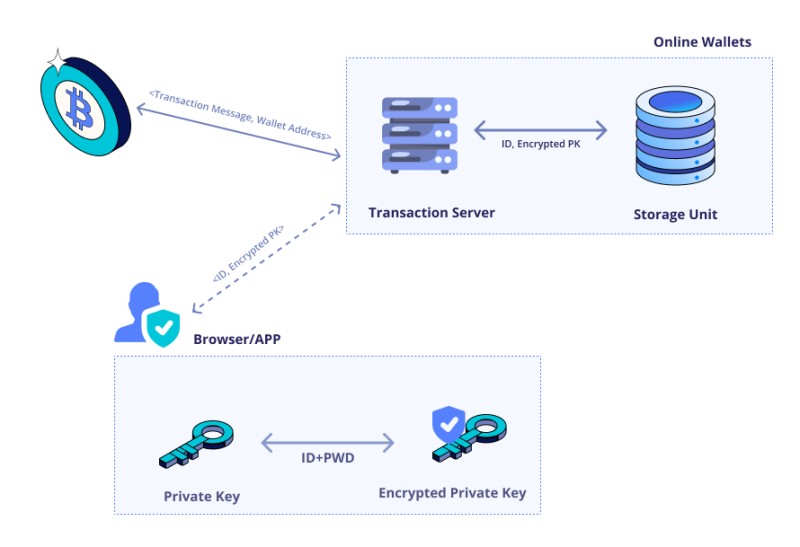
Online wallets are called hot wallets. They connect to the net, so you can trade fast. But that same link exposes keys to malware and phishing. Offline wallets are cold, and they stay cold until you plug them in.
The main split is convenience versus security. Hot wallets are quick but risky. Cold wallets are slow to use but hard to hack. For long-term holds and big sums, cold is the sane pick.
Types of wallet by connection
- Hot wallet: always online, fast, risky
- Cold wallet: offline, slow, safe
- Warm wallet: keys online but human must sign
When you think about how to store crypto safely , the offline part matters most. A cold wallet just removes the net from the attack path.
Paper Wallets as Cold Storage
A paper wallet is a type of cold wallet. It's your private key or seed phrase printed on paper, often as a QR code. You can receive funds by scanning that code. But it can't send on its own.
To spend from a paper wallet, you must type the seed into a hot or hardware wallet. On the Ergo chain, a paper wallet shows a public key, three receive addresses, and a seed phrase. It is read-only until you import it.
Paper wallets should be handled like cash; if the paper is lost, the value is lost.
Some simple paper options are Bitkee, Cryptotag, and Cryptosteel. They give direct control of keys with no hardware. Keep them dry and in a safe spot, low humidity helps.
Hardware Wallets and Real Devices
A hardware wallet is a physical device, often like a flash drive. Ledger is one such example of cold wallets. It holds keys offline and signs tx on the device itself. You confirm moves by hand on the unit.
These devices cost money up front, but they let you sign and keep full access. Many work with several blockchains. They often add a PIN or biometric lock. Tangem makes hardware only and does not custody your coins.
For best hardware wallet talk, people often name Ledger, Trezor, Keepkey, Keystone, Coldcard Mk4, and Tangem. Keystone Pro and Coldcard Mk4 are air-gapped, meaning no direct wire needed.
Specific Examples of Cold Wallets
Let's name a few clear examples of cold wallets so it's not just vague talk. Ledger is a hardware wallet that supports many chains. Trezor is a popular investor choice. Keystone is cold hardware, with an air-gapped Pro model.
Cold wallet names from the source
- Ledger: hardware, multi-chain, offline keys
- Trezor: hardware, common cold pick
- Keystone: cold hardware, Pro is air-gapped
- Coldcard Mk4: air-gapped hardware wallet
- Keepkey: hardware, listed with Trezor and Ledger
- Bitkee, Cryptotag, Cryptosteel: paper wallet options
- Tangem Hardware Wallet: made by Tangem AG
- Ergo Paper Wallet: read-only, chain-specific
- Ergo Android Offline Wallet: old phone, signs via QR
If you want a best buy ledger wallet , the Ledger Nano shows up as a popular stable option. Keystone and Trezor sit beside it on most lists.
Examples of hardware wallets include Ledger, Trezor, Keepkey, Keystone, Coldcard Mk4, and Tangem Hardware Wallet.
Offline Phone as a Cold Wallet
An offline phone or computer with a wallet app can act as cold storage. On Ergo, an old Android device with the wallet app works. It stays off the net and makes one-time QR codes to sign.
Setup is simple: put the phone in airplane mode, install the app, make a wallet, then add it read-only on your daily device. To send, you scan a QR from the hot wallet, sign offline, and scan back. That's a real cold wallet example.
How Cold Wallets Work Day to Day
All cold storage comes with a seed phrase, private key, public key, and receive addresses. The seed can restore the wallet if the device breaks. Enter it and you get the keys back.
For hardware, the device keeps keys and gives proof to sign. It is cold because it is not always online. Makers say write the seed on paper and store it safe. Without physical access, these are hard to exploit.
Paper wallets stay read-only. To send, use the seed with a hot wallet like Nautilus or Terminus on Ergo. The offline Android method uses QR scans between the two devices. No constant net needed.
Is Cold Wallet Safe
People ask me is cold wallet safe and the short answer is yes, from online hacks. Cold storage is practically immune to remote attacks. The risk shifts to physical loss or damage.
Store the device in a home safe. Paper goes in low humidity. Hardware and offline phones resist damage and have password locks. But the seed phrase should sit elsewhere, like a paper copy in a different place.
Cold wallets are practically immune to online hacks, but physical risks exist: devices can be damaged, lost, or stolen.
Best Cold Wallet Crypto for Beginners
If you're new, best cold wallet crypto for beginners usually means a hardware unit with clear steps. Ledger and Trezor have simple flows. A paper wallet is cheap but clumsy for sends.
The trezor cold wallet is often suggested to first-timers since the setup is plain. Keystone Pro is air-gapped if you want no cable at all. Pick based on how often you move coins.
Beginner cold picks
- Ledger Nano: popular, stable, multi-chain
- Trezor: easy setup, common choice
- Keystone Pro: air-gapped, QR based
- Paper wallet: low cost, read-only
Cold Wallet Crypto App Options
Some ask about a cold wallet crypto app and the honest answer is an app alone is not cold unless the device stays offline. The Ergo Wallet app on an old Android, in airplane mode, is one working case.
You install it, cut the net, and use QR to sign with a hot device. That keeps keys off the wire. It's not a fancy product, just a phone doing one job. Works fine for cold storage.
Best Hardware Wallet for Cryptocurrency
For best hardware wallet for cryptocurrency , the source lists Ledger, Trezor, Keepkey, Keystone, Coldcard Mk4, and Tangem. Each holds keys offline and signs on device.
Coldcard Mk4 and Keystone Pro are air-gapped, good if you hate cables. Tangem is hardware only, no custody of your assets. Ledger and Trezor get named most for stability and range of support.
A onekey wallet review is not in the source, so I won't make claims. Stick to the named ones when you choose. The source is clear on those.
Best Wallet Cryptocurrency Choice for You
The best wallet cryptocurrency call depends on your use. Big sum, long hold, go cold. Small sum, daily trade, hot is fine. Many keep most in cold and a little in hot.
Cold fits large amounts and patience. Hot fits speed and dApps. The split is common sense. Don't put life savings on an exchange hot wallet if you can avoid it.
Custodial vs Non-Custodial Cold
A custodial wallet is run by a firm that holds your keys, like a big exchange. The saying goes "not your keys, not your coins." If they block access or go broke, you're stuck.
A self-custodial wallet means you alone hold keys. No middleman, no KYC. Cold wallets are non-custodial by class. Ledger is an example of self-custodial. Your control, your risk, your safety.
Cold wallets are classified as non-custodial.
Hot vs Cold Side by Side
Hot wallets connect to the net, free to download, fast to trade. They talk to dApps and support HD addresses. But they catch malware and phishing easy.
Cold wallets are offline, high security, less handy for trades. Hardware costs money. Paper is cheap but read-only. Use cold for the long haul and big stacks.
Quick compare
- Hot: fast, free, risky
- Cold: slow, costs for hardware, safe
- Use both: cold for save, hot for spend
Choosing and Security Best Practices
When you choose, think about how often you use coins, size of stack, and risk mood. Big crypto and care for safety means cold is ideal. Paper is easy for long store. Hardware costs more but signs.
Best practices: use two-factor auth, keep backups, store seed offline. Skip public Wi-Fi. Cold wallets want backup devices and key copies. The seed is the master key, anyone with it takes the funds.
Protect seed phrase: anyone with seed can access funds.
Phishing is a top threat, per a data breach report. Software wallets can fall for it no matter hot or cold. Multisig, like Casa with 3-key or 5-key plans, stops single point of failure. Hardware is only as safe as the seed spot.
Why Offline Matters for Sleep
I like the vault comparison. Cold storage is like gold in a secure vault: less handy but more protected. You don't need it daily, you need it intact.
The safest plan is majority in cold, minority in hot for trades. Combine cold hardware with multisig for high value. That logic is sound for big holders.
Examples of cold wallets are not magic. They just remove the net and keep keys in your hand. That's the whole trick, and it works.
Physical Safety You Should Not Skip
Hey, don't skip this part. Cold wallets cut online risk but not real-world risk. Devices get lost, burned, or taken. Paper gets wet or torn.
Store cold device in home safe. Paper in low humidity away from sun. Hardware has password but seed should be separate, on paper in another spot. If device and seed both go, wealth is locked out.
Chain Specific Cold Notes
On Ergo, two cold options are paper wallet and offline Android wallet. Ledger support was in final stages at the time of writing, so check current state before buy. The chain shows read-only and QR sign methods.
The Ergo paper wallet gets a public key, three receive addresses, and seed. The offline Android uses airplane mode and QR. Both are real cold wallet examples from the source.
Warm Wallets as a Middle Step
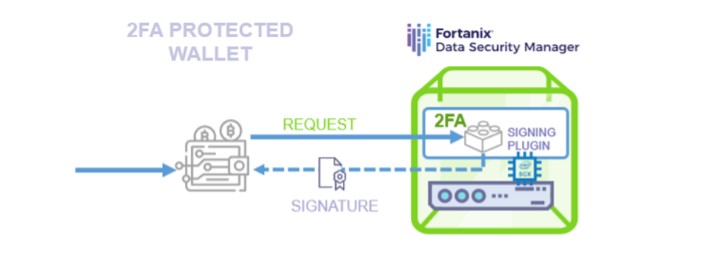
Warm wallets sit between hot and cold. Keys stay online but a human must sign, often with 2FA in a safe compute space. It's a managed service idea, not core cold storage.
The source names a warm option with SDK for web3 and 2FA moved to secure compute. It cuts trust need for firms. But for personal cold, hardware or paper is the direct path.
Final Word on Examples of Cold Wallets
So we went through paper, hardware, offline phone, and chain-specific cases. Examples of cold wallets like Ledger, Trezor, Keystone, and paper kits all share one trait: offline keys.
Pick by habit and stack size. New users can start with a known hardware unit. Old hands may like air-gapped or paper. Either way, keep the seed safe and sleep easy.
Comments on “What to Consider When Picking Examples of Cold Wallets Like a Sensible Human”
No comments yet. Be the first to share your thoughts.